M1 Finance Review: The Robo-Advisor Built for DIY Investors
M1 Finance blends automation with hands-on control. Here's how it works, who it fits, and where it falls short.
Most robo-advisors take a simple approach: you answer a few questions, they pick a portfolio, and you never touch it again. M1 Finance goes in the opposite direction. It hands you the steering wheel and says, “Build whatever you want — we’ll just keep the car running.”
That’s either exactly what you’ve been looking for or exactly what you’ve been trying to avoid. This review will help you figure out which camp you’re in.
We may earn a commission if you open an account through one of our links, which keeps the lights on here at KatchingStacks. It also doesn’t change what we say below — M1 has real tradeoffs and we’re going to name them.
KatchingStacks is reader-supported. When you open an account through links on this page, we may earn a commission at no extra cost to you. See our affiliate disclosure and editorial policy.
What M1 Finance Actually Is
M1 calls itself a “finance super app,” but at its core it’s a brokerage with automation bolted on. You build something called a Pie — a visual breakdown of the stocks and ETFs you want to own, with each slice representing a target percentage of your portfolio.
Once your Pie is built, M1 handles the rest. When you deposit money, it automatically buys whatever’s underweight to keep you in balance. When you withdraw, it sells whatever’s overweight. You don’t place trades — you just fund the account and let the Pie do its job.
That’s the key mental shift. Traditional brokers make you pick individual buys and sells. Traditional robo-advisors pick everything for you. M1 lets you pick the recipe once, then automates the cooking.
The Pie System, Explained Plainly
Let’s say you want 40% in an S&P 500 index fund, 20% in a total bond ETF, 20% in a tech-heavy fund, and 20% split across five individual stocks. In M1, you’d build a Pie with those exact percentages.
Now you deposit $500. M1 looks at your current holdings, sees that your tech slice is underweight by the biggest percentage, and directs most of your $500 there. Next month, bonds might be the laggard. You don’t have to think about it.
You can also build Pies inside Pies. A “Core” Pie might hold your broad index funds, and a “Satellite” Pie might hold individual stock picks. You combine them into one master Pie with whatever weighting you want. It’s clean, visual, and frankly more intuitive than the menus most brokers use.
Fees and Minimums
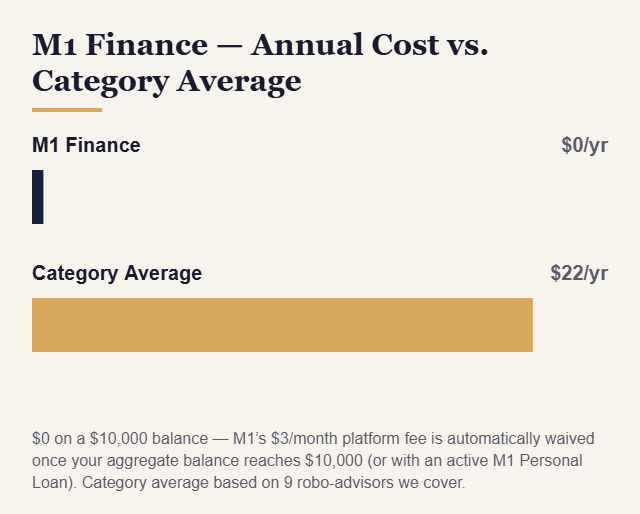
The headline is that M1 has no management fee on its basic tier. That’s unusual — Betterment charges 0.25%, Wealthfront charges 0.25%, and most human advisors charge 1% or more. M1 makes money through interest on uninvested cash, payment for order flow, and a $3/month platform fee. That fee is automatically waived if your aggregate M1 balance reaches $10,000 at any point in your 30-day billing cycle, or if you have an active M1 Personal Loan — otherwise it applies to every account. (M1 Plus, a former $125/year premium add-on with perks like a higher-yield cash account and a second daily trading window, was discontinued in 2024; those perks are now included for everyone at no extra cost.)
For most investors who keep at least $10,000 on the platform, M1 is effectively free. Below that threshold, budget for the $3/month fee.
The account minimum is $100 for taxable accounts and $500 for retirement accounts. Once you’re in, there’s no minimum balance to maintain.
Where M1 Shines
The Pie system rewards people who know what they want their portfolio to look like. If you’ve read a few John Bogle books and you’re dead set on a three-fund portfolio, M1 lets you build it once and automate it forever — for free. That’s genuinely hard to beat.
Fractional shares are another quiet superpower. You can own 0.03 shares of Amazon if you want. That means your Pie can stay perfectly balanced even if you’re only depositing $50 a month, because M1 can buy tiny slices of expensive stocks.
Borrowing is also integrated. If you have at least $2,000 in a taxable account, you can borrow against it at competitive rates through M1 Borrow. That’s useful for advanced users — and dangerous for everyone else. More on that in a second.
Where M1 Falls Short
The biggest limitation is also the biggest selling point flipped around: M1 doesn’t give you advice. There’s no risk questionnaire, no auto-generated portfolio for beginners, no hand-holding. If you don’t know what you want to own, M1 isn’t going to tell you. It has pre-built “Expert Pies” you can start from, but even choosing one requires some baseline literacy.
Trading windows are another friction point. M1 executes trades in two daily windows for all users (a former M1 Plus-only perk, now included for everyone since M1 Plus was discontinued in 2024). That’s intentional — it’s built for long-term investors, not active traders — but if you want to react to news in real time, you can’t.
Tax-loss harvesting, which Betterment and Wealthfront offer automatically, isn’t part of M1’s core offering in the way it is at those competitors. If that’s a big deal to you, factor it in.
And the margin borrowing product, while cheap, is genuinely risky. Borrowing against your portfolio to buy more stock is a fine way to amplify gains and an even better way to amplify losses. Most beginners should pretend that button doesn’t exist.
Who M1 Is For (And Who It Isn’t)
M1 is a great fit for the investor who’s done some reading, has a target allocation in mind, and wants to automate contributions without paying an advisory fee. If you’re nodding along to terms like “three-fund portfolio” or “sector tilt,” you’ll probably love it.
It’s a bad fit for the investor who wants to hand over the wheel entirely. If you’d rather answer five questions and never think about your portfolio again, Betterment or Wealthfront will serve you better. And if you want a human to call when markets get ugly, M1 isn’t that either.
Bottom Line
M1 Finance is what you get when a brokerage and a robo-advisor have a baby: the automation of the latter with the control of the former, at a price point that’s hard to argue with. For DIY investors who want to stop manually placing trades without giving up control over what they own, it’s one of the best products on the market.
Just be honest with yourself about which kind of investor you are before you sign up.
Quick Links
If you’re ready to build your first Pie, you can open an M1 Finance account and start with as little as $100.
Want a newsletter that explains money stuff without the jargon? Subscribe to KatchingStacks — one short email a week, no spam. And if you’re still deciding between robo-advisors, our Acorns vs Wealthfront vs Betterment breakdown is probably your next read.
How M1 Pies Actually Work
M1’s defining feature is the “Pie” — a visual representation of your portfolio as a circular chart, where each slice is a position (stock, ETF, or even another Pie) with a target weight you set. When you deposit money, M1 automatically buys into each slice proportionally. When slices drift from target weights, the algorithm rebalances back toward them when you add new money or you trigger a manual rebalance.
You can build a Pie from scratch — choosing any combination of stocks and ETFs available on M1 — or choose from Expert Pies pre-built by M1’s team. Expert Pies include allocations like “Responsible Investing,” “Hedge Fund Follower” (mimicking public 13F filings), and various target-date retirement allocations. Most investors land somewhere between fully custom and fully template — they start with an Expert Pie and modify it over time.
M1 Finance for Long-Term Passive Investors
Despite its DIY reputation, M1 is an excellent platform for passive, long-term investors who simply want a specific portfolio of low-cost ETFs — like a three-fund portfolio (total US market, international, bonds) — held and automatically rebalanced without paying an advisory fee. Used this way, M1 functions almost identically to Betterment or Wealthfront but at zero management fee, with the tradeoff that you have to select and maintain the portfolio yourself.
For investors who know what they want — who’ve read enough to build a simple ETF portfolio and just need a platform to execute it — M1 is one of the cheapest ways to do it with automatic rebalancing and fractional shares.
The Tax Situation on M1
M1’s free Lot Relief Method attempts to minimize taxes by prioritizing which tax lots it sells, but M1 does not offer the same automated tax-loss harvesting that Betterment and Wealthfront provide. For taxable accounts with significant gains, this matters. Betterment and Wealthfront will automatically harvest losses to offset gains; M1 requires you to identify and execute tax-loss harvesting manually, which most investors simply don’t do.
Who M1 Finance Is Best For
M1 shines for: self-directed investors who know exactly what they want in a portfolio, existing stock investors who want automation without giving up control, and anyone who wants to replicate a specific investment strategy (a model portfolio, factor tilts, or a specific ETF mix) without paying a management fee.
It’s a worse fit for: complete beginners who need guidance building an appropriate portfolio, investors who want someone else to make all the decisions, and anyone who values tax-loss harvesting enough to pay a small fee for it.
The Bottom Line
M1 Finance is best understood as a self-directed investing platform with exceptional automation features — not a traditional robo-advisor that holds your hand through portfolio construction. Used correctly, it’s one of the most powerful and cost-efficient investment platforms available. The key word is “correctly.” It rewards investors who know what they want and gives more rope to those who don’t.
M1 Finance is built for investors who want control over their own portfolio design. If you would rather have a fully hands-off, professionally managed option, see our Best Robo-Advisors 2026 comparison for the full lineup.
The “Free” Math: What M1’s Zero Fee Actually Saves (and Costs) You
M1 Finance charging no management fee is a genuine advantage — on a $50,000 taxable account, that’s $125/year you’re not paying Betterment or Wealthfront. But M1 also doesn’t automate tax-loss harvesting the way those platforms do, and that missing piece has its own dollar value, especially as a taxable balance grows.
| Taxable balance | M1 fee | Betterment fee (0.25%) | Est. TLH value at Betterment (0.10%–0.77%) |
|---|---|---|---|
| $25,000 | $0 | $62.50 | $25–$192.50 |
| $50,000 | $0 | $125 | $50–$385 |
| $100,000 | $0 | $250 | $100–$770 |
Read this as a trade, not a verdict: M1 saves you the fee outright, guaranteed, every year. Betterment’s fee buys a shot at tax-loss harvesting whose value swings widely with market conditions — some years it’s worth less than the fee itself, and in volatile years it can be worth several times the fee. If you’re the kind of investor who’d actually execute manual tax-loss harvesting yourself on M1’s platform, you can capture some of that value without paying for it. Most people, honestly, won’t get around to it.
My Honest Take on M1 Finance
M1 is the right call if you already know what you want your portfolio to look like — a three-fund index approach, a dividend-growth tilt, whatever it is — and you just want to automate buying and rebalancing it for free. Fractional shares and the Pie system make that genuinely painless, and I’d take M1 over paying a management fee for a portfolio I could build myself in twenty minutes.
Where I’d steer someone away from M1: if you don’t have a clear idea what to invest in, M1 won’t tell you — there’s no guided questionnaire building a portfolio for you the way Betterment does. And if you’re sitting on a large, growing taxable account and know you won’t manually harvest losses yourself, the “free” fee can end up costing more than it saves in the years that matter most. See how M1 stacks up against the guided platforms in our Best Robo-Advisors 2026 comparison.
Sources: Fees and terms: M1 pricing (last verified September 2026).